

A free IPTV trial isn’t something to assume: trial availability and refund terms can vary. The best IPTV subscription in the USA is the one whose channel lineup, on-demand library, plan terms, and support match what you actually watch and need. A short trial of 7-30 days is a useful window for evaluating a service before committing.
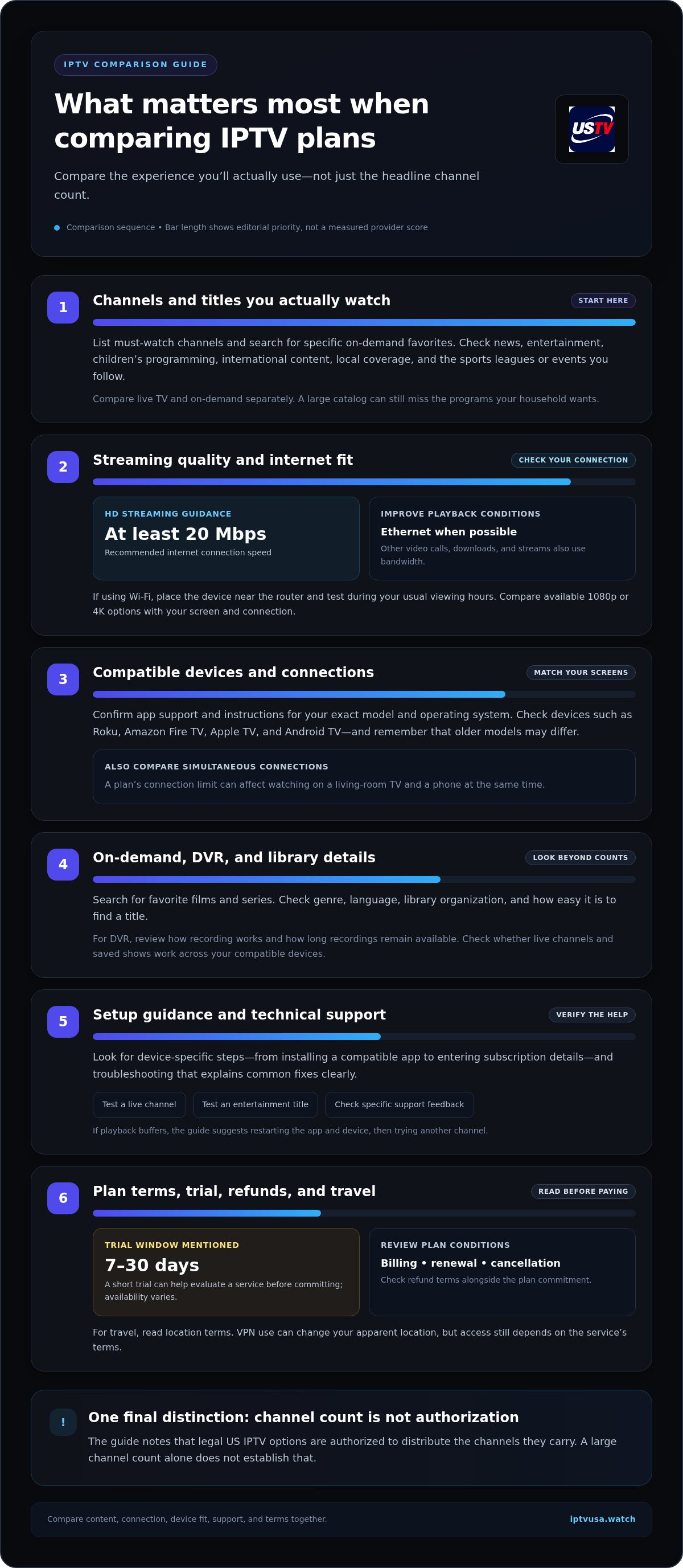
Compare more than the headline channel count. The channels you watch, streaming quality, setup guidance, technical support, and plan terms all shape your day-to-day experience.
This guide explains how to compare IPTV subscriptions, from channels and on-demand libraries to setup, support, plans, pricing, and trial access. You’ll also learn how internet performance affects streaming and which service details to review before choosing.
Key Takeaways
- Compare channel categories and on-demand titles you’ll actually watch, not just the headline library count.
- Assess stream quality, uptime, device options, setup guidance, and technical support before choosing a plan.
- For HD streaming, plan for an internet connection of at least 20 Mbps; Ethernet can help improve performance when available.
- Review plan terms and trial or refund conditions together so you can weigh the commitment as well as the price.
Features to compare when choosing an IPTV provider
In 2026, legal US IPTV options are services authorized to distribute the channels they carry; a large channel count alone doesn’t establish that. Compare device support, connection limits, streaming quality, library features, and travel terms before choosing.
Streaming Device Compatibility
Compatibility determines which screens can stream with your subscription. Match the service’s supported-device information to your exact model and operating system, such as Roku, Amazon Fire TV, Apple TV, or an Android TV device. A device name alone may not be enough: older models can run different software or lack app support. Check the screen you plan to use before choosing a plan, especially if people in your household use different devices.
Apps and Device Connections
Look for a compatible app or clear connection instructions for each device. The app affects everyday tasks such as finding favorite channels, browsing categories, and resuming a program. Compare how many simultaneous connections each plan includes, too. If a plan limits connections, streaming on a living-room TV and a phone at the same time may require separate access. For travel, read the service’s location terms. VPN use can change your apparent location, but access still depends on those terms.
Internet Speed for Reliable Streaming
For HD IPTV streaming, the recommendation is an internet connection of at least 20 Mbps. Available bandwidth matters: video calls, downloads, and other streams compete with television for capacity. Connect the streaming device through Ethernet whenever possible to improve performance. If Wi-Fi is the only option, place the device near the router and test playback during your usual watching hours. For 1080p or 4K, compare the provider’s available picture-quality options with your screen and connection.
On-Demand, DVR, and Simultaneous Streaming
No single US IPTV service is best for every on-demand library, DVR feature, or simultaneous-streaming need. Compare the specific titles you want, how recording works, and how many devices can stream at once. A broad library is useful only if it includes programs your household watches. Check how long recordings remain available and whether live channels and saved shows work across your compatible devices. These details reveal how well a service fits your viewing routine, beyond its headline channel count.
Live TV channel and on-demand library counts
A high channel count doesn’t show whether an IPTV service suits your household. Compare the live TV categories, specific channels, and on-demand titles you want to watch.
Live Channel Lineup
Start with the channels you watch regularly, then sort them by category: news, entertainment, children’s programming, and international content. A provider’s total may include channels you’ll never use, so look for familiar names and relevant regional coverage. Check whether the lineup clearly separates live channels from on-demand programs. This makes channel counts more meaningful and helps you see whether the service fits your routine.
On-Demand Library
A video-on-demand library lets you choose programs whenever you’re ready, instead of watching only during a live broadcast. Compare films and series by genre, language, and availability, then search for a few favorite titles. Even a large catalog can feel limited if it misses the shows your household wants. Check how the library is organized, too. Clear categories and useful search tools make specific programs easier to find.
Sports, Local, and Entertainment Channels
Sports coverage depends on the leagues and events you follow, while local channels provide regional news and programming. Make a short list of must-watch channels, including a local news station, a sports channel, and an entertainment favorite. Compare that list with the lineup instead of relying on broad labels such as “sports” or “premium.” For international viewing, note the languages and regions that matter to your household.
Compare live and on-demand content separately, then note any gaps. If a channel count looks impressive but excludes your local station or favorite sport, the service may not suit you. Include customer support in your comparison: help finding a channel or understanding library access can make a service easier to use. A focused lineup may be more useful than a plan packed with content you won’t watch.
Installation guidance and technical support
Setup matters when connecting an IPTV app to a smart TV or Android device. Compare the installation steps, troubleshooting guidance, customer support, and payment terms before subscribing.
Installation and Setup Guidance
A useful setup guide explains each step, from installing a compatible app to entering subscription details. Check that the instructions match your device, such as Android TV rather than a phone running Android. Have your network name and login details ready, then test a live channel and an entertainment title. Clear steps can help you identify whether a problem comes from the app, connection, or device.
If buffering occurs, restart the app and streaming device, then try another channel. Look for IPTV setup guidance that explains common fixes without assuming advanced technical knowledge. A clear process should help you distinguish playback issues from sign-in or app-navigation problems. Keep the instructions somewhere accessible, especially if you’re setting up more than one screen.
Customer Support and Service Feedback
Useful customer support explains how to report a problem and what information to include. For example, note the device model, app, affected channel, and whether other streams work. Read customer testimonials for specific descriptions of setup help or troubleshooting, rather than relying on general praise. Look for details relevant to your situation, such as help with an Android TV installation or repeated buffering.
Payment terms deserve the same attention as setup. Review the billing cycle, renewal terms, cancellation steps, and refund conditions before paying. A short trial lasting 7-30 days and transparent refund terms are practical comparison points. Treat trial access as a way to test the app, picture quality, and support process. Record the trial end date so you can make a timely decision about continuing monthly service.
Subscription plans and prices
Finding the best IPTV subscription in the USA starts with matching plan features to your viewing needs, not choosing a plan just because it says “premium.” A service focused on live sports may suit you better than one centered on movies or on-demand viewing. List the channels and features you expect to use, then compare plans against that list.
The price depends on your situation and is provided after a quote request. Plan type, connection needs, billing term, and included features all affect the cost. Review the total commitment, renewal terms, and cancellation process before choosing monthly or longer-term billing. A lower starting price may not suit you if it excludes connections or viewing features your household needs. The best IPTV subscription in the USA is the one whose terms and features fit your routine.
Use this checklist to compare options:
- Check how many simultaneous connections the plan allows.
- Compare live channels and on-demand movies with your viewing priorities.
- Review picture-quality options, including 1080p or 4K where available.
- Read trial and refund terms before payment. A short trial of 7-30 days is a useful comparison point.
Connection limits affect how a plan works across a household. If people watch on separate screens at the same time, compare the plan’s simultaneous access with your needs. Don’t assume every subscription supports multiple devices at once. Reliable streaming also depends on your home internet connection and device.
Look beyond the monthly amount. Confirm what renews, when billing occurs, and how to cancel. Compare equivalent features across plans so premium labels don’t distract from practical differences. If setup assistance matters, weigh support alongside channels, sports, movies, and connection access. This gives you a clearer picture of value before subscribing.
To compare subscription options against your viewing needs, explore IPTV subscription options and review the plan details before deciding.
WATCH US TV: Premium Strong8k Elite Plans
WATCH US TV offers Premium Strong8k Elite Plans for viewers seeking a high-performance television streaming subscription. These plans provide a next step after comparing channel needs, device compatibility, and viewing habits. USTVAWATCH Elite Plans and USA TV SUBSCRIPTION SERVICE are also options for people looking for a structured TV subscription.
Choose a plan by matching your priorities to the type of service you want. If high-performance streaming is your focus, explore Premium Strong8k Elite Plans. If you’re comparing subscription options, consider USTVAWATCH Elite Plans alongside your viewing needs. Review the plan information to decide which option best aligns with your television preferences.
Visit WATCH US TV’s subscription options to explore the plans.
Choose a Plan That Fits Your Next Chapter of Viewing
Finding the best IPTV subscription in the USA starts with how you want to watch, not a one-size-fits-all checklist. Consider who shares the screen, which programs you return to, and how much flexibility you want as your preferences change. The best IPTV subscription in the USA should fit your routine now and make sense for the entertainment you plan to watch next.
WATCH US TV offers Premium Strong8k Elite Plans, USTVAWATCH Elite Plans, and USA TV SUBSCRIPTION SERVICE. Compare these options with your priorities in mind. If high-performance streaming is your focus, explore Premium Strong8k Elite Plans. Your best IPTV subscription in the USA is ultimately the one that aligns with your viewing preferences.
Ready to take the next step? Contact WATCH US TV to explore your subscription options. Here’s to finding a service that makes your next viewing choice feel straightforward.
Frequently Asked Questions
Do you have a free trial?
Free trials aren’t standard across IPTV subscriptions, so compare trial access separately from paid-plan terms. WATCH US TV offers subscription plans; don’t assume a trial is included. If a service provides a trial, use it to test the programs and devices that matter to you. Read the refund conditions and note when trial access ends before deciding whether to continue.
How Can I Get Started?
Start by choosing a WATCH US TV subscription plan that suits your viewing priorities. Then use a compatible streaming device and internet connection to access the digital TV service. Keep your chosen plan details available during setup, and follow the instructions provided for accessing the subscription on your platform. WATCH US TV’s offerings include Premium Strong8k Elite Plans and USTVAWATCH Elite Plans.
Is an IPTV Subscription Legal in the USA?
IPTV technology itself doesn’t determine whether a subscription is lawful. The key issue is whether the service is authorized to distribute the programming it streams. Before subscribing, look for clear service information and identifiable plan terms. Be cautious of claims promising every channel or event without explaining what the subscription covers. A large lineup alone doesn’t establish distribution rights.
How much do popular US IPTV subscriptions cost per month, including fees and add-ons?
Monthly IPTV subscription costs vary by plan, billing term, included features, and connection needs. WATCH US TV’s price depends on your situation and is provided after a quote request. Compare the complete amount due, renewal terms, and any applicable fees or add-ons instead of judging by a headline rate. Check whether the plan’s features justify the ongoing cost for your household.
Which IPTV services offer the best live TV channel selection, including local channels and regional sports networks?
The strongest lineup is the one that includes your must-watch local stations, sports coverage, and entertainment channels. List the teams, leagues, local news, and regular programs you care about, then compare each service’s channel guide with that list. Regional sports availability can differ by market, so a broad sports label doesn’t guarantee access to the specific network or games you want.
Which IPTV services carry local ABC, CBS, NBC, and FOX channels in my ZIP code?
Availability of local ABC, CBS, NBC, and FOX channels depends on the service’s lineup for your market. Use your ZIP code as a starting point, then compare each network separately rather than assuming all four are included together. Note the local station’s call sign, too, since the affiliate serving one area may differ from the station available in another. This helps you spot gaps before subscribing.

